
Reversing entries are journal entries you record on the first day of a new accounting period to cancel out certain adjusting entries made at the end of the previous period. They are the exact opposite of the original entry: same accounts, same amounts, debits and credits switched.
Reversing entries are optional, but for contractors who accrue payroll, subcontractor costs and unbilled revenue every month, they save time and prevent one of the most common bookkeeping errors: counting the same cost twice. This guide explains how reversing entries work, which entries to reverse and which to leave alone, and walks through construction examples step by step.
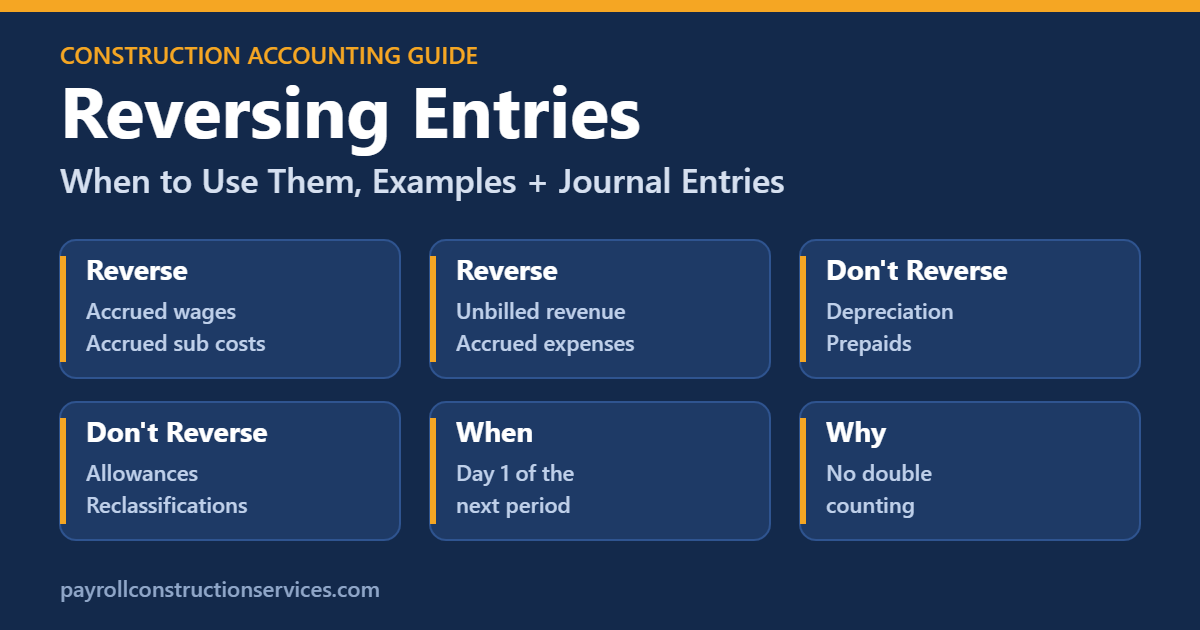
What Are Reversing Entries in Accounting?
At month-end you record adjusting entries so revenue and expenses land in the right period. Some of those adjustments are estimates of bills or payrolls that will arrive next month. When the real transaction shows up, it gets posted the normal way. If the original accrual is still sitting on the books, the cost is now recorded twice: once by the accrual and again by the actual bill.
A reversing entry solves this by “undoing” the accrual on day one of the new month. The real transaction then posts normally, and the net result is that the new month only shows the portion of cost that truly belongs to it.
In one sentence: reversing entries let your bookkeeper enter bills and payrolls the normal way without having to remember which part was already accrued last month.
How Reversing Entries Work: Simple Example
On September 30, Ridgeline Builders accrues $14,500 of electrical subcontractor work that was done in September but will not be invoiced until October 10.
September 30 – adjusting entry
| Account | Debit | Credit |
|---|---|---|
| Subcontractor Costs – Job 101 | $14,500.00 | |
| Accrued Subcontractor Costs Payable | $14,500.00 |
October 1 – reversing entry
| Account | Debit | Credit |
|---|---|---|
| Accrued Subcontractor Costs Payable | $14,500.00 | |
| Subcontractor Costs – Job 101 | $14,500.00 |
On October 10, the sub’s pay application arrives for $14,500. The AP clerk enters it normally: debit Subcontractor Costs $14,500, credit Accounts Payable $14,500.
| Account activity in October | Subcontractor Costs – Job 101 |
|---|---|
| Oct 1 reversing entry | ($14,500) |
| Oct 10 vendor bill | $14,500 |
| Net October cost | $0 |
September shows the $14,500 cost (where the work happened), October shows none of it, and the accrued liability is cleared. Nobody had to remember the accrual when entering the bill.
What If the Actual Bill Is Different?
If the October 10 invoice comes in at $15,200 instead of $14,500, October will show $700 of subcontractor cost ($15,200 − $14,500). That $700 is a true-up of the September estimate, which is normal and usually small. If the differences are large, improve how you estimate accruals.
With vs. Without Reversing Entries
| Step | With reversing entries | Without reversing entries |
|---|---|---|
| Sept 30 | Accrue $14,500 cost | Accrue $14,500 cost |
| Oct 1 | Reverse the accrual | Nothing |
| Oct 10 bill entry | Debit sub cost $14,500 (normal) | Debit Accrued Payable $14,500 (special handling) |
| Risk | Low: routine process | High: AP clerk must know about the accrual |
| October cost result | Correct | Correct only if bill was coded to the liability |
Without a reversal, the bill must be coded against the accrued liability instead of the expense. That works in a small office, but it breaks down when several people enter bills, when the bill amount differs from the accrual, or when the accrual covered several vendors.
Which Entries Should Be Reversed?
A simple rule: reverse accruals of items that will be recorded again by a normal future transaction. Do not reverse entries that will not be repeated by a future bill, payroll or invoice.
| Adjusting entry | Reverse it? | Why |
|---|---|---|
| Accrued wages and payroll taxes | Yes | Next payroll records the full amount |
| Accrued subcontractor and supplier costs | Yes | The vendor bill records the full amount |
| Accrued utilities, fuel, equipment rentals | Yes | Next invoice records the full amount |
| Unbilled T&M or service revenue | Yes | The customer invoice records the revenue |
| Accrued interest expense | Usually | Next loan payment records the interest |
| Over and under billings | Often | Many contractors reverse and rebook from the new WIP schedule |
| Depreciation | No | No future transaction repeats it |
| Prepaid insurance amortization | No | The prepaid balance just keeps going down |
| Deferred revenue recognized | No | Balance is reduced cumulatively |
| Allowance for doubtful accounts | No | Adjusted to the new estimate each period |
| Reclassifications and error corrections | No | They fix the books permanently |
Reversing Entries for Accrued Payroll
Payroll is where contractors use reversing entries the most. Crews are often paid a week in arrears, so every month-end has unpaid labor. Our full guide to the accrued payroll journal entry covers how to calculate it. Here is how the reversal works:
- Nov 30: accrue $24,000 of wages and $4,116 of labor burden for unpaid days.
- Dec 1: reverse the full $28,116.
- Dec 4 and Dec 11: run payroll normally. The November portion is offset by the reversal, so December only carries December labor.
Reversing Over and Under Billings
Over and under billings come from your WIP schedule. There are two common methods:
- Reverse and rebook: reverse last month’s over and under billing entries on day one, then book new entries from the current WIP schedule at month-end. Simple and easy to audit.
- Adjust to balance: do not reverse; instead, book only the change needed to bring the balance sheet accounts to the new WIP totals.
Both methods give the same ending balance. Reverse-and-rebook is usually easier for bookkeepers because each month stands on its own. Learn more in our guide to over billing vs. under billing.
How to Set Up Auto-Reversing Entries in Your Software
- QuickBooks Online Advanced: create the journal entry and use the reverse option, or save it as a recurring template you reverse each month.
- QuickBooks Desktop (Accountant/Enterprise): open the entry and click Reverse; it creates the opposite entry dated the first day of the next month.
- Sage Intacct, Sage 100 Contractor, Foundation and Viewpoint: most include an “auto-reverse” checkbox and a reversal date on the journal entry screen.
- Xero: use the “auto-reversing date” field on a manual journal.
If you are choosing a new system, check how it handles reversing journals and job coding on journal lines. Our review of construction accounting software compares the main options.
More Reversing Entry Examples for Contractors
Unbilled T&M Revenue
On October 31, a service crew finished $6,200 of time-and-materials work that will be invoiced on November 3. You accrue the revenue in October and reverse it on November 1.
October 31 – accrue unbilled revenue
| Account | Debit | Credit |
|---|---|---|
| Unbilled Receivables | $6,200.00 | |
| Service Revenue | $6,200.00 |
November 1 – reversing entry
| Account | Debit | Credit |
|---|---|---|
| Service Revenue | $6,200.00 | |
| Unbilled Receivables | $6,200.00 |
When the $6,200 invoice is created on November 3, it credits Service Revenue as usual. November nets to zero for that work, and October keeps the revenue it earned.
Accrued Interest on an Equipment Loan
Ridgeline has an equipment loan with interest paid on the 15th of each month. At October 31, half a month of interest ($850) has built up but is not due until November 15.
October 31 – accrue interest
| Account | Debit | Credit |
|---|---|---|
| Interest Expense | $850.00 | |
| Accrued Interest Payable | $850.00 |
On November 1 the entry is reversed. When the November 15 loan payment is recorded with $1,700 of interest, November only keeps $850, its own half of the month.
Equipment Rental Billed in Arrears
Rental companies often bill monthly in arrears. If a lift rented for Job 103 ran all of October but the $3,400 invoice arrives November 8, accrue it to Job 103 on October 31 and reverse it on November 1. The job carries the cost in the month the lift was used, which keeps percent complete accurate.
A Real-World Scenario: How a Missed Reversal Doubles Costs
A remodeling company accrued $32,000 of field payroll at the end of March. The bookkeeper forgot to reverse it. In April, the payrolls for the last week of March and all of April posted normally. April labor showed $32,000 too high, April gross profit dropped by the same amount, and two jobs suddenly looked like they were losing money.
The project managers spent hours looking for cost overruns that did not exist. The fix was a single entry, but the confusion lasted weeks. Using auto-reversing journals, or adding “reverse all accruals” as step one of the monthly close, prevents this completely.
Step-by-Step: Reversing Entries in Your Monthly Close
- Close the prior month. Make sure all adjusting entries for the month are posted and financial statements are final.
- Run a list of last month’s accruals. Filter the general ledger for accrued liability accounts and unbilled receivables.
- Post the reversals dated the first day of the new month, with the same job and cost codes as the original entries.
- Check the balances. After reversals, the accrued liability accounts should be at or near zero (except for items like PTO that are not reversed).
- Process bills and payrolls normally throughout the month.
- At month-end, book new accruals and set them to auto-reverse again.
Reversing Entries at Year-End and During an Audit or Review
Year-end works the same way, with one extra step: your CPA may propose additional adjusting entries after you have already closed December and started January. If any of those are accruals, they also need a matching reversal in January. Ask your CPA for a list of proposed entries and mark which ones should reverse.
Auditors and reviewers like to see a clean trail. Keep a short schedule each month listing every accrual, the amount, the support (timesheets, sub pay apps, rental contracts) and the reversal date. It makes year-end faster and shows that your month-end process is consistent.
Benefits of Using Reversing Entries
- No double counting: costs and revenue are recorded once, in the right month.
- Simpler data entry: AP clerks and payroll staff post bills and payrolls the normal way, every time.
- Cleaner liability accounts: accrued payables reset each month, which makes reconciliation fast.
- Accurate job costing: job cost reports show what really happened each month, not timing noise.
- Faster closes: once set up as auto-reversing entries, the process runs itself.
- Easier reviews: CPAs, sureties and lenders can follow a consistent, documented process.
Reversing Entries and Job Costing
Job costing is where timing errors hurt contractors the most. Every accrual you post to a job changes that job’s cost to date, which changes percent complete and earned revenue on the WIP schedule. If the reversal is posted without the same job and cost code, the original job keeps the accrued cost and the next bill adds it again, while the reversal lands in a general account. The job cost report then looks wrong even though the general ledger totals are fine.
The fix is simple: always reverse with the same job, cost code and cost type as the original line. Most construction software does this automatically when you use the built-in reverse feature. If you create reversals manually, copy the original entry and swap the debit and credit columns rather than typing a new entry from scratch.
A quick check at the start of each month is to run a job cost report filtered for the first day of the month. Each job with an accrual last month should show a matching negative amount from the reversal. If any job is missing its reversal, fix it before bills start posting.
Reversing Entries vs. Correcting Entries
These are different tools. A reversing entry is a planned, routine step that cancels a temporary accrual. A correcting entry fixes a mistake, such as a bill coded to the wrong job or an expense posted to the wrong account. Correcting entries are not reversed later; they are meant to be permanent.
Never use a reversing entry to “hide” a mistake. If last month’s accrual was wrong, let the true-up flow through the current month or post a separate correcting entry with a clear memo.
Common Reversing Entry Mistakes
| Mistake | What happens | Fix |
|---|---|---|
| Reversing depreciation or prepaids | Expense disappears; asset balances wrong | Only reverse accruals |
| Forgetting to reverse | Costs doubled next month | Use auto-reverse in your software |
| Reversing on the wrong date | Reversal lands in the same month as the accrual | Date it the first day of the next period |
| Coding the bill to the liability AND reversing | Liability goes negative; cost understated | Pick one method and stick to it |
| Reversal posted without job codes | Job cost reports swing wildly | Reverse with the same job and cost codes |
Do Small Contractors Need Reversing Entries?
If you keep cash-basis books, you probably do not record accruals and therefore do not need reversals. But once you move to accrual-basis financial statements, which most sureties and banks require, reversing entries become one of the easiest ways to keep month-end clean. For tax accounting methods, see IRS Publication 538 and talk to your CPA.
Reversing Entries Checklist
- List every accrual posted at the end of last month.
- Mark each one as reverse or do not reverse using the table above.
- Date reversals on the first day of the new period.
- Use the same accounts, jobs and cost codes as the original entries.
- Confirm accrued liability balances drop to zero after the reversals post.
- Process bills and payroll normally for the rest of the month.
- Review true-up differences at month-end and improve estimates if they are large.
Following this list every month keeps reversing entries routine. Over time, most of the work can be automated so your bookkeeper spends minutes on reversals instead of hours tracking down double-counted costs. That frees up time for the higher-value parts of the close, such as reviewing job profit and updating the WIP schedule with your project managers.
One last tip: write a short note in the memo of every reversing entry that names the original accrual, such as “Reverse 10/31 accrued sub cost – Job 103 rental.” Six months later, anyone reviewing the ledger will understand exactly why the entry exists.
Let Us Handle Your Month-End Close
Payroll Construction Services books your accruals, sets up auto-reversing entries and reconciles every liability account each month, so your job costs and financial statements are always reliable. See our construction bookkeeping and construction accounting services, or contact us for a free review.
Reversing Entries FAQs
Are reversing entries required?
No. Reversing entries are optional. They are a time-saving technique that lets you record next period’s bills and payrolls normally without double-counting accrued amounts.
When are reversing entries made?
On the first day of the new accounting period, right after the books for the prior period are closed.
Which adjusting entries should not be reversed?
Do not reverse depreciation, prepaid expense amortization, deferred revenue recognition, allowances or reclassifications.
What is the difference between a reversing entry and an adjusting entry?
An adjusting entry is recorded at period-end to put revenue or expense in the right period. A reversing entry is recorded on day one of the next period to cancel certain adjusting entries.
Do reversing entries affect the financial statements?
They do not change the prior period’s statements. In the new period, they offset the actual transaction so only the correct amount stays in that period.
Final Thoughts
Reversing entries are a simple habit that keeps accruals from turning into double-counted costs. Reverse accrued payroll, subcontractor costs and unbilled revenue on day one of each month, leave depreciation and prepaids alone, and let your software do the work with auto-reversing journals.